Simple Process

Three steps to more 5-star reviews.

Register, print your QR code, start collecting reviews. Under five minutes, no technical knowledge needed.

4.9 ★★★★★
from 480k+ reviews collected
4.9
★★★★★
Average
rating
A
Aisha K.

"Took me two minutes to set up — reviews started the same day."

480k+
Reviews collected
What's Included

Everything you need to turn up the reviews

Every plan comes with the full toolkit — there's no separate "analytics add-on" or "reports upgrade" to buy later.

Customer scanning a QR code to leave a review 📱 Scan to Rate

Instant QR codes

Generated the second you register — download, print, and you're collecting reviews before your next customer walks in.
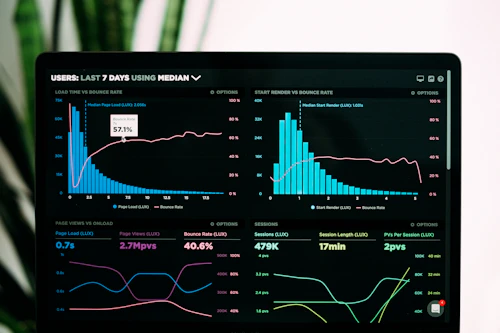
Live rating dashboard showing incoming reviews ★ Live Rating: 4.9

Live rating dashboard

Every star and every written comment appears the moment it's submitted — no refreshing, no waiting for a weekly export.

Business owner checking a low-star review alert on their phone 🔔 New 3★ Review

Instant low-star alerts

Get notified the moment an unhappy customer leaves feedback, so you can respond and turn the experience around fast.

Weekly PDF review report ready to download 📄 Weekly Report

PDF reports

Weekly and monthly summaries land in your inbox automatically — share them with your team without building a slide deck.

Built For

Made for every kind of local business

If customers walk through your door, StarReview works for you.

Restaurant
Most popular
Restaurants
Salon
Trending
Salons & Spas
Retail
New
Retail & Shops
Fitness
Growing
Fitness & Wellness
The Process

From sign-up to your first review

Here's exactly what happens at each step — no hidden setup, no waiting on approvals.

Registering a business
Step 01

Register your business

Create a free account with your business name, category, and contact details. There's no approval queue and no waiting period — your account and your unique QR code are both generated the instant you submit the form, and the whole process takes under two minutes.

  • Fill in your business name, category, and contact details
  • Your QR code is generated automatically — no design skills needed
  • Your dashboard is live instantly — your review feed starts here
  • Set your own rating questions to match what matters to your business
01
02
QR code displayed on a table
Step 02

Display your QR code

Download your QR code as a high-resolution PNG and place it wherever your customers naturally look at the moment their experience ends — on tables, at the counter, printed on receipts, or by the front door. No app store listing, no download required on their end.

  • Download as a high-resolution PNG — print at any size
  • Place it where the experience ends — tables, counters, receipts
  • Customers see it at the exact moment they feel most satisfied
  • One QR code, unlimited scans — no per-scan fees
Reviews arriving on dashboard
Step 03

Watch reviews come in

A customer scans your code, rates their experience in about 30 seconds, and submits — no app download, no account, no login required on their side. You see every rating and every written comment the moment it arrives, with low-star reviews flagged for you to follow up on immediately.

  • Customers scan, rate, and submit in under 30 seconds
  • Reviews appear live — star rating plus written comment
  • Download weekly and monthly PDF reports anytime
  • Get an instant alert the moment a low-star review lands
03
Business owner checking customer ratings ★★★★★

Ready to collect your first review?

Register in 2 minutes. No credit card required, and nothing for your customers to install.